The Problem with Manual Debugging
When a server goes down, every minute counts. Traditional debugging means SSHing in, running commands, reading logs, and hoping you spot the issue. Scale that to dozens of VMs and it's a full-time job. We wanted to automate this, but not with brittle scripts that only handle known cases. We needed something that could reason about new problems. That's why we built Batuta AI.
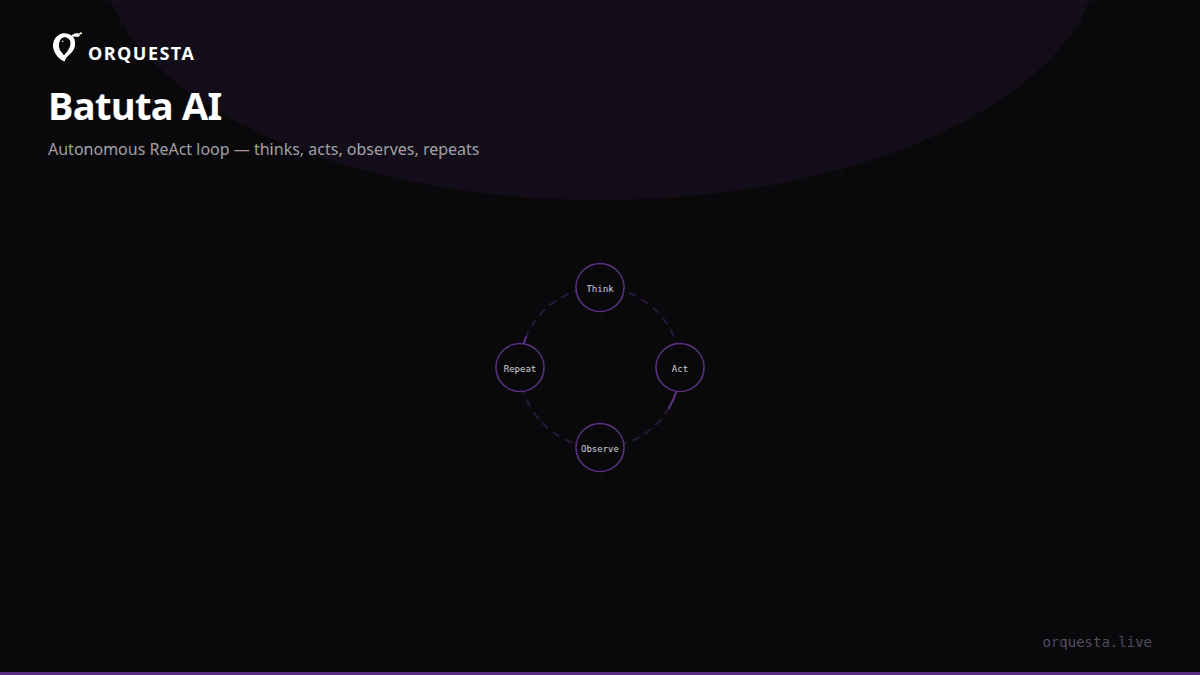
Batuta is an execution mode in Orquesta that connects to cloud VMs over SSH and uses a ReAct loop (Think > Act > Observe > Repeat) to diagnose and fix issues autonomously. It doesn't just run a predefined playbook; it iterates, learns from each command's output, and decides the next step until the task is complete. I'll walk through how it works, with real examples from our own infrastructure.
ReAct Loop in Practice
The ReAct loop is the core of Batuta's intelligence. At each iteration, the model:
- Think: Analyze the current state, past observations, and the original prompt to decide what to do next.
- Act: Execute a command over SSH (or sometimes a local action, but usually SSH).
- Observe: Capture the command's stdout, stderr, and exit code.
- Repeat: Feed the observation back into the next thinking step.
This loop continues until the model declares the task done or a safety limit is reached. Crucially, the model never sees the SSH credentials or the raw connection; it only proposes commands, which Batuta executes in a controlled environment.
Here's a simplified pseudocode of the loop:
ssh_client = connect_to_server(host, key)
observations = []
for step in range(max_steps):
    thought = model.think(prompt, observations)
    if thought.action == "done":
        break
    if thought.action == "run_command":
        cmd = thought.command
        # Sanitize/validate command (no interactive sessions)
        stdout, stderr, exit_code = ssh_client.execute(cmd)
        observations.append({
            "command": cmd,
            "stdout": stdout,
            "stderr": stderr,
            "exit_code": exit_code
        })
    # Optionally, thought could include "ask_human" for safety
The model can also request file contents, list directories, or even apply patches. But everything goes through SSH exec, not a full terminal, which keeps things predictable and auditable.
Connecting to Cloud VMs
Batuta supports standard SSH authentication: key-based or password (though we recommend keys). When you trigger a Batuta run, you provide the host, user, and key (or reference a stored credential in Orquesta). Batuta establishes a single SSH session and reuses it for all commands, reducing connection overhead.
We also support SSH config files, bastion hosts, and proxies, but for simplicity, here's a basic connection snippet using Paramiko (our Python SSH library):
import paramiko
client = paramiko.SSHClient()
client.set_missing_host_key_policy(paramiko.AutoAddPolicy())
client.connect(hostname="my-vm.example.com", username="ubuntu", key_filename="/path/to/key.pem")
Once connected, Batuta runs commands with a timeout (default 30 seconds) and captures output with a max buffer (e.g., 100KB) to prevent hanging or overwhelming the model context.
Real Example: High CPU Usage
Let's see Batuta in action. I'll narrate a real debugging session from a staging server that suddenly spiked to 100% CPU.
Prompt to Batuta: "The server node-1 has high CPU usage. Find the cause and fix it."
Batuta starts by running top, but we've configured it to prefer non-interactive commands first. It actually runs:
ps aux --sort=-%cpu | head -n 10
Output (truncated):
USER       PID %CPU %MEM    VSZ   RSS TTY      STAT START   TIME COMMAND
ubuntu   12345 98.3  0.5 249876 45678 ?        R    14:32   3:22 /usr/bin/python3 /opt/app/worker.py
ubuntu   12346 50.1  0.4 235678 43210 ?        R    14:32   1:45 /usr/bin/python3 /opt/app/worker.py
...
Batuta's thought: "The process worker.py (PID 12345) is consuming most CPU. It's a Python script in /opt/app. Let's check what it's doing. I'll look at the process command line and open file descriptors."
Next command:
ls -l /proc/12345/fd
Output shows many sockets, indicating network activity. Batuta then runs:
ss -tunap | grep 12345
It sees the process making many connections to an external IP. Aha! Batuta reasons: "This looks like a runaway process making excessive outbound connections, possibly a bug or a fork bomb. I'll check the script's recent logs."
It runs:
tail -n 50 /var/log/worker.log
Logs show repeated errors connecting to a database. Batuta concludes: "The worker is stuck in a retry loop, spawning new connections without backoff. The immediate fix is to kill the process and restart the service to apply a configuration fix."
But before killing, Batuta checks if the service is managed:
systemctl status worker
Then:
systemctl stop worker && kill -9 12345 12346 || true
systemctl start worker
It verifies CPU usage dropped:
ps aux --sort=-%cpu | head -n 5
Now CPU is back to normal. Batuta reports the root cause and actions taken, and in Orquesta's UI, you see a full audit trail of every command and output.
That's a simple case, but it demonstrates the loop: Batuta didn't just run a kill command; it investigated step by step, adapting based on observations.
Real Example: Disk Full
Another common issue: disk space exhaustion. A production database server started throwing "no space left on device" errors.
Prompt: "The DB server db-1 is out of disk space. Find what's taking up space and clean it safely."
Batuta first confirms:
df -h /
Output:
Filesystem      Size  Used Avail Use% Mounted on
/dev/sda1        50G   50G   20K 100% /
Then it finds large files:
du -ah / | sort -rh | head -n 20
It discovers a 30GB log file in /var/log/myapp/access.log. Batuta checks if it's safe to truncate:
lsof | grep access.log
No process has it open, so truncation is safe. Batuta decides:
truncate -s 0 /var/log/myapp/access.log
But it's smart enough to also check log rotation. It sees no logrotate config for that file, so it suggests adding one. In the same run, it can create a logrotate entry and restart the logging service. The whole process took less than a minute, whereas a human would spend 10-15 minutes.
Safety and Guardrails
Autonomous action on production servers is scary. That's why Batuta has built-in safety measures:
- Command allowlist/denylist: We block destructive commands like
rm -rf /,dd,mkfs, etc. by default, but you can customize. - Dry-run mode: Batuta can propose commands without executing, for review.
- Human approval: For high-risk actions (e.g., killing processes, deleting files), Batuta can pause and ask for confirmation via the Orquesta UI or Telegram.
- Audit trail: Every command, output, and thought is logged and encrypted. You can replay the entire session.
- Timeout and max steps: Prevent infinite loops.
We also use ReAct's "think" step to have the model state its reasoning before acting, which helps us audit decisions.
How Batuta Fits into Orquesta
Batuta is one of four execution modes in Orquesta. The others are Auto, SSH, and Agent (Claude CLI). Batuta stands out because it's fully autonomous with a reasoning loop. You can invoke it directly from the Orquesta UI, CLI, API, or even Telegram. It's perfect for routine maintenance, incident response, and one-off fixes.
Because Orquesta runs locally and streams output in real-time, you can watch Batuta's thought process live in the Agent Grid. You're never in the dark.
Limitations and Future Work
Batuta is not a silver bullet. It works best on well-defined issues with accessible logs and standard Linux tools. Complex, multi-service failures may still require human expertise. The model can also be wrong; that's why we emphasize auditability and optional approval steps. We're continually improving the model's reasoning and expanding the command library.
Takeaway
Batuta AI brings the ReAct loop to server debugging. It's not magic; it's a disciplined process of think, act, observe, repeat, constrained by SSH and safety guardrails. We've used it to cut down MTTR for common issues from hours to minutes. If you manage cloud VMs, this is the kind of automation that actually saves time without sacrificing control.