We built Orquesta to let teams turn prompts into code, PRs, and deployments. But letting an AI agent loose on your codebase with full autonomy is a recipe for disaster. The tension is real: you want the speed of autonomous execution, but you need control over what gets changed. That's where quality gates come in. They let the agent run at full speed, simulate the changes, and present a diff for human approval before anything touches the real environment.
The Tension Between Autonomy and Control
When we first started building Orquesta, we gave the agent full run of the repo. It was fast—sometimes too fast. It would refactor entire modules, add dependencies we didn't want, or "fix" things that weren't broken. The output was impressive, but reviewing the aftermath was like cleaning up after a hurricane. We needed a way to keep that speed while adding a checkpoint that didn't grind everything to a halt.
The naive solution is to have the agent explain every step and wait for approval. That kills the momentum. Nobody wants to click "approve" on every file write. The better approach is to let the agent do its thing in a simulated environment, produce a complete set of changes, and then have a human review the final diff. That's exactly what quality gates do.
How Quality Gates Work in Orquesta
In Orquesta, a quality gate is a configurable step in the agent's execution pipeline. When enabled, the agent runs in "simulation mode." It has full access to the repository, but instead of committing directly to the main branch, it creates a set of proposed changes—essentially a patch or a series of commits on a feature branch. The agent streams its output as usual, but the real git history isn't touched.
Once the agent finishes, the generated diff is presented for review. A designated reviewer—usually a team lead or senior engineer—can inspect the changes, comment, and either approve or reject. If approved, the changes are applied to the real branch and merged. If rejected, they're discarded, and the agent can be re-prompted with feedback.
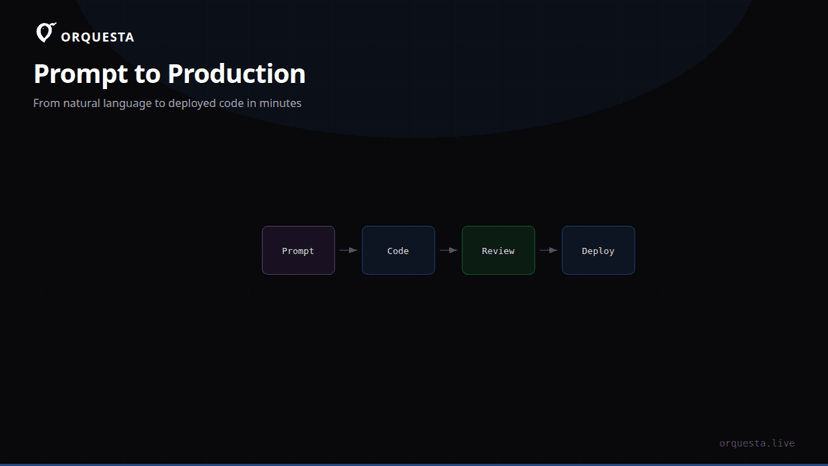
This flow is similar to how pull requests work, but the key difference is that the agent produced the entire change set autonomously before any human looked at it. The human only reviews the final result, not the intermediate steps. This gives you the speed of autonomy with the safety of a review gate.
Simulation Mode: The Technical Details
The trickiest part was building a simulation mode that feels real to the agent but doesn't modify the actual repository. We handle this by running the agent in a git worktree. A worktree is a separate working directory linked to the same repository, so the agent can make changes, run tests, and even commit locally without affecting the main checkout. When the agent finishes, we compare the worktree's branch with the base branch to generate a diff.
# Create a new worktree for the agent's run
git worktree add ../agent-run-123 -b agent/feature-123

# Agent runs inside ../agent-run-123, making commits as it goes

# After the agent completes, generate the diff
git diff main...agent/feature-123 > changes.patch
The patch is then shown in the Orquesta dashboard as a standard PR-style diff. The reviewer can see file changes, additions, deletions, and even the commit messages the agent used. The agent's own commit messages often provide useful context, but we don't rely on them for approval—the code is what matters.
One important detail: the agent's simulation mode still respects your CLAUDE.md sync. That means coding standards and project conventions are enforced even during simulated runs, so the diff you review already follows your team's rules. No surprises.
Configuring Quality Gates
We made quality gates flexible because different teams have different risk tolerances. In Orquesta, you can configure:
- Who can approve: specific users or roles.
- Required approvals: one or more.
- Scope: gates can apply to all prompts or only those touching certain files (e.g., production code vs. documentation).
- Auto-merge: if the gate passes, should the changes be applied automatically or wait for a manual merge?
- Timeout: if no one reviews within a set time, the changes expire.
For teams that want even more control, we support multiple gates: one for code review, one for security scanning, one for cost approval, etc. But the core value is the simulation-review-apply loop.
A Real Workflow
Here's how it plays out in practice. A developer submits a prompt: "Fix the login bug where users can't reset passwords." The agent picks up the prompt, spins up a worktree, and starts working. It streams its terminal output to the Orquesta dashboard, so the team can watch if they want, but nobody has to intervene. After a few minutes, the agent has made several commits: updated the auth service, added a test, and fixed a typo in the docs.
The agent then opens a quality gate. The diff appears in the dashboard with all changes. A team lead glances at it: the auth service change looks correct, the test is reasonable, but the docs change is unnecessary. They leave a comment: "Remove the docs change and re-run." The agent picks up the feedback, removes the docs commit, and re-submits. This time the lead approves. The changes are merged to main, and the agent automatically creates a PR for the remaining steps (like deployment) if configured.
That's the speed of autonomy with a human checkpoint. The developer who submitted the prompt never had to write a line of code. The team lead spent maybe two minutes reviewing. The agent did the heavy lifting.
Why Quality Gates Beat YOLO Mode
Fully autonomous mode—what we call "YOLO mode"—is tempting. You set the agent loose and hope for the best. But in practice, it only works for trivial tasks or when you're willing to accept frequent breakage. Quality gates give you a middle ground. The agent still moves fast, but you're not betting the farm on every run.
There's a psychological benefit too. When people know they'll review the final diff, they're more willing to let the agent try ambitious changes. That leads to better outcomes because the agent isn't constrained by fear of breaking things. It can refactor, experiment, and propose bold solutions, knowing that a human will catch any problems.
The Cost of Review
Of course, quality gates aren't free. Someone has to do the reviewing. But we've found that the review burden is much lower than reviewing the agent's step-by-step actions. A typical agent run produces a diff of 50–200 lines. That's a five-minute review. Compare that to pair programming with the agent or manually executing each step—quality gates are far more efficient.
To further reduce fatigue, we're experimenting with AI-assisted review: an LLM that summarizes the diff and highlights risky changes before a human looks at it. But the human is still the final decision-maker.
Conclusion
Quality gates have become the default for most Orquesta teams. They give you the speed of autonomous AI agents without the recklessness. The agent simulates changes, a human reviews the diff, and only then does the code hit the real branch. It's not about slowing down the AI; it's about building trust. Once that trust exists, you can gradually loosen the gates for low-risk tasks and keep them tight for critical paths.
The next time you're tempted to let an AI agent run wild, try a quality gate instead. You might be surprised how fast and safe it feels.